- Home
- News
- News items
- Zennio DALI Box: bringing DALI lighting control into KNX
Zennio DALI Box: bringing DALI lighting control into KNX
Lighting is one of those areas where the right gateway makes all the difference between a clean install and a headache. When a project calls for DALI luminaires inside a KNX system, whether it's an office fitout, a hotel corridor or a large residential job, Zennio's DALI Box range gives integrators a way to bring both worlds together without extra complexity on site.
The range covers everything from simple broadcast control to full individual addressing, so the right device really comes down to how much control the project needs over each ballast.
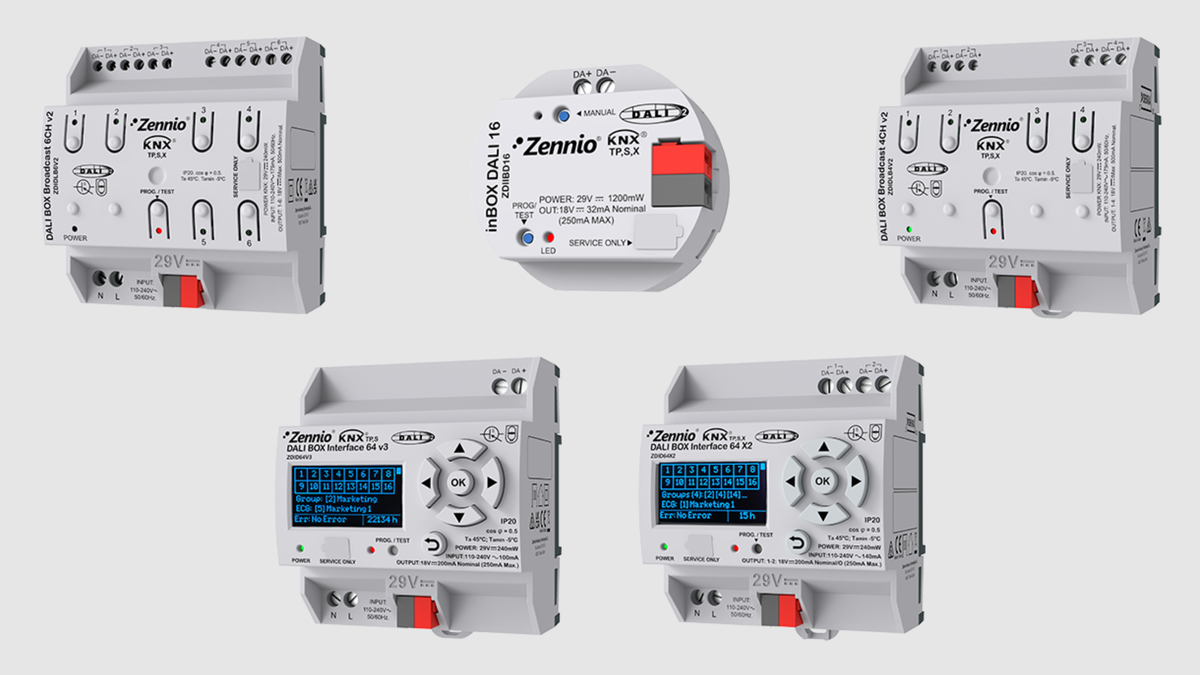
Broadcast control: DALI BOX Broadcast 6CH v2 and 4CH v2
For projects where entire zones need to move together, the Broadcast 6CH v2 and 4CH v2 are built for exactly that. Each one mounts on a DIN rail (4.5 units) and manages either 6 or 4 channels via broadcast commands, with support for up to 250 ballasts per device and up to 64 ballasts grouped on each channel.
Both models support DT8 color ballasts, so tunable white and RGB fittings are covered as well as standard dimmable ones, and each channel can hold up to 20 scenes or sequences, useful for anything from simple on/off zones to more elaborate lighting scenes. Manual control and LED status indicators per channel make life easier during commissioning and fault finding, and both units are compatible with KNX Secure and with energy monitoring through DT51 (part 252), so power consumption data can feed straight back into the building management system.
Individual addressing: DALI BOX Interface 64 X2 and 64 v3
When a project needs control down to the individual luminaire rather than just the group, the Interface 64 X2 (two channels) and 64 v3 (one channel) step in. Each channel handles up to 64 DALI ballasts, which can be arranged into up to 16 groups, but every ballast can also be addressed on its own, and new groups can be created directly from KNX without touching the DALI side again.
Both interfaces are certified as Multi Master DALI-2 controllers and are compatible with DALI inputs, which opens the door to DALI sensors and push buttons sitting on the same line. They include a built in display and ETS DCA (Data Collection and Analysis) tool, which takes a lot of the guesswork out of addressing ballasts, especially when a faulty one needs replacing on site. Error indicators per ballast flag issues before they turn into a callback, and both units support emergency lighting (DT1) alongside DT8 color ballasts and DT51 energy monitoring. The 64 X2 adds KNX Secure on top.
Compact and flush mounted: inBOX DALI 16
Not every job has room for a DIN rail enclosure, and that's where the inBOX DALI 16 comes in. It's a flush mounted interface for up to 16 DALI ballasts, powered directly from the KNX bus so there's no need for a separate auxiliary supply, which is a real advantage on renovations or smaller boards where space and wiring are tight.
Ballasts can be grouped (up to 16 groups) or controlled individually, all dimming points on the channel can be switched manually, and the same ETS DCA tool found on the Interface range simplifies setup and ballast replacement. It also carries DT1 emergency lighting, DT8 color ballast and DT51 energy monitoring compatibility, plus Multi Master DALI-2 certification and support for DALI inputs.
One protocol, the right level of control
What ties the whole DALI Box range together is flexibility. Broadcast models suit large zoned areas where simplicity and channel count matter most, the Interface models suit projects that need precise, individual control and diagnostics, and the inBOX version handles the jobs where space is the limiting factor. All of them speak the same DALI-2 language on one side and KNX on the other, so switching between models across projects doesn't mean relearning anything.
If you're speccing a project with DALI luminaires and want help picking the right DALI Box for the job, get in touch with us and we can talk through the options.


